
-
Introduction to Version Control
The LogicNets Version Control functionality allows multiple Designer users to access and maintain content in the same project. It allows identified Designer users to check out a project from a…
-
When to Use Version Control
This article outlines the key benefits of version control and highlights when/how it might be useful. Version Control The Version Control feature allows multiple Designer users within the same…
-
Version Control: Getting Started
Introduction Before the release of the LogicNets Version Control function, users assigned to the same Designer workspace and working on the same project had difficulty collaborating on content.…
-
Working with Version Control: Check Out and Check In
In version control, the system identifies projects with the modified blue folder icon as those that are available for checkout. Project A in the screenshot below is an example of this.…
-
Revision History
If a project is under version control, the revision history table shows all activity for that project, including user, check-in date, revision notes, and status.…
-
Customizing Revision Status in Version Control
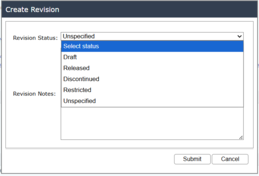
Description With v8.4+, the System Configuration package has a customizable list of revision status labels, allowing you to name revisioning steps based on your company's internal processes and…
-
Team (group) vs Individual (strict) Version Control
When you use version control, the system checks out and locks projects at the Workspace/Designer level. However, you can set up your workspace(s) to allow for team control versioning or for stricter…
This section contains articles and updates on using version control to effectively collaborate with others and curate content.