
Instructions on How to Use Example Projects
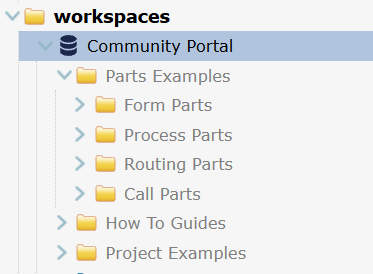
The Community Portal Shared Workspace contains project examples that demonstrate the use and configuration options in LogicNets parts, How to Guides and other useful information.
Set Up
If your account does not show the Community Portal workspace as shown above, it will need to be configured. Review this article and check with your System Administrator on the required configuration.
Inspecting and Running an Example Project
The projects shown in the Community Portal workspace are maintained by LogicNets and updated for new features and releases automatically so you always have access to the latest versions.
To inspect and test/run any of the projects requires you to make a linked copy under your own Projects folder.
- Expand the folder(s) in the Community Portal Shared Workspace, and select your target project
- Click Copy at the top of the Explorer window
- Select the destination folder in your workspace (anywhere under the Projects folder)
- Click Paste (also found at the top of the Explorer window)
Running the Example Project
Depending on how it is set up, you can run it as follows:
- select the Project folder and click Test
- expand the logicnets folder, select the TEST Me logicnet and click Test
Exploring the Example Project in Detail
The project in your workspace is still linked to the original copy and is marked as read-only. You cannot check out this project or check in any changes to this copy but you can inspect all the logicnets, nodes and settings. They are set to read-only.
Customizing an Example Project for your Needs
If you want to investigate the project in more detail, for instance, by changing some of the parameters to mirror your scenario, you can unlink the project to make it your own as follows:
- select the project folder
- locate and click the Unlink button on the far right
From this point, this project is a non-controlled copy, belonging to you, ready for you to edit to suit your situation. The project folder loses the shared workspace icon and the project is now fully editable.
Reply
Content aside
- yesterdayLast active
- 4Views
-
1
Following