
Deployment Manager Prerequisites and Roles
Prerequisites
To use the Deployment Manager, your LogicNets installation must specifically include it. It is an optional, add-on component of the Shared Workspaces license. Once Deployment Manager is part of your build installation, navigate to the Access Management package on your dashboard to configure user access.
User Deployment Manager Access
As with other applications, for someone to use the Deployment Manager you must give them access by adding them to an existing group that has access to the application or by creating a custom group, configuring it, and adding the user to it as a member.
When Deployment Manager is added to your installation, the system automatically includes a group called system.deployment-managers, which is configured with the appropriate roles. The easiest way to give a user access to the Deployment Manager is to make them a member of that group.
Configure Group Roles
To configure a group role, you can either create a custom group and make it a member of the existing system.deployment-managers role with access to the Deployment Manager, or you can add the Deployment Manager as a package in the custom role you created and configured.
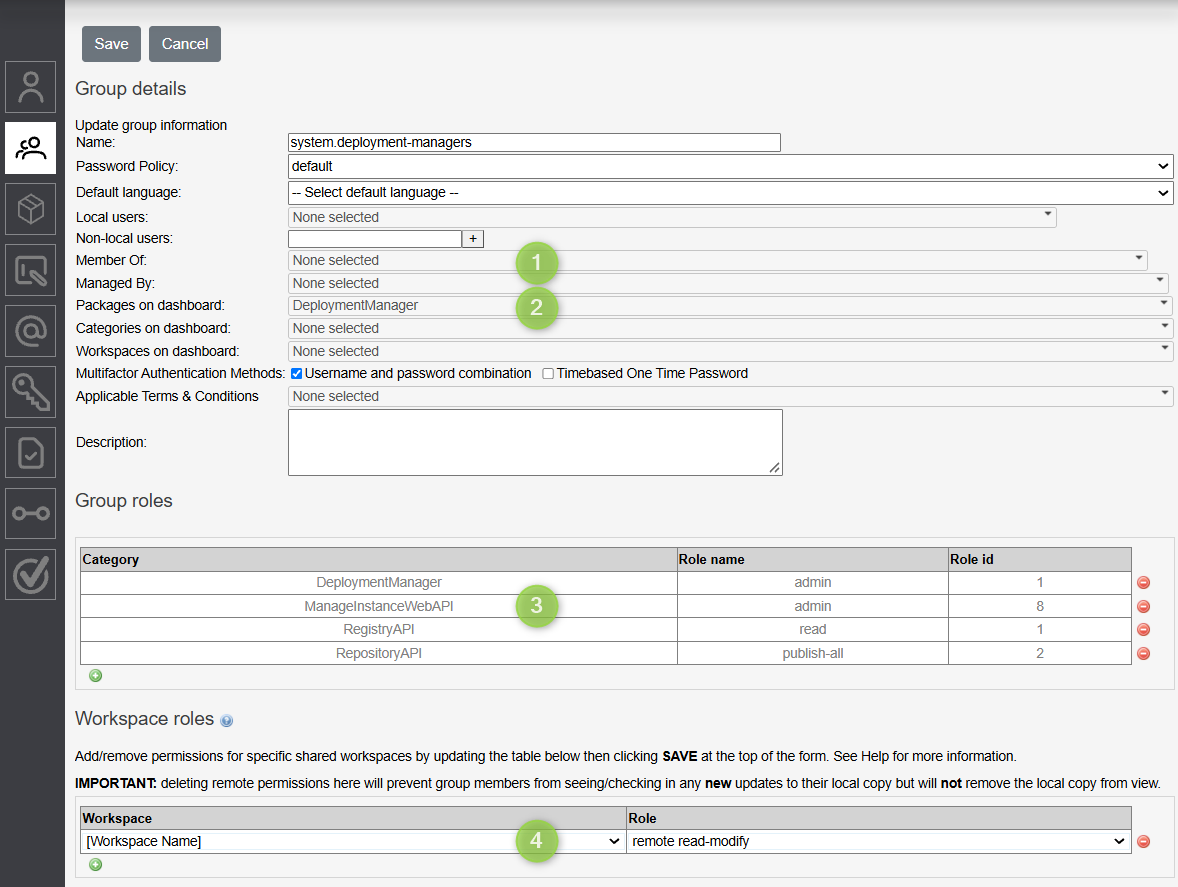
- If you create a custom group--for example, one for use with IdP access--you can add that custom group to the system.deployment-managers group as a member. This ensures that the group includes the relevant roles. To do this, go to your custom group and use the option highlighted with 1 in the image below.
- OR, to configure the custom group manually, do the following
- Add DeploymentManager to the Packages on dashboard in your custom group. See 2 in the image below.
- Assign the following specific categories and roles to your group manually, as identified in the image below in 3.
| Category | Role | Note |
| DeploymentManager | admin or view_deployment |
Use the view_deployment role for any user group that needs to see the versions of installed packages and where they are installed. This group cannot create or modify deployment sets. It cannot add or remove deployment configurations from instances. |
| ManageInstanceWebAPI | admin | |
| RegistryAPI | read | |
| RegistryAPI | write | |
| RepositoryAPI | publish-all |
Configure Workspace Roles
In the Workspace roles section of the group configuration page, identified in the image below with 4, assign the workspaces to which the deployment managers have access. Typically, this is your primary editorial workspace. If you use Shared Workspaces, however, this will likely be the Master workspace that contains all of your projects.
| Workspace | Role |
| [All Relevant] | remote read-modify |
Reply
Content aside
- 1 mth agoLast active
- 19Views
-
2
Following