
Hidden Input
Description
You can use HTML inputs to transfer data in your application from a browser to a server. Most of these inputs are user-visible data that the user has entered in the application. However, there are cases where it is useful to have a client-side script post data to the server on the backend of the application. The hidden_input part allows you to do that.
The part receives the data and stores it in the context. The part also reads the context data and sends it to the browser, so the client-side script can read the data as well. Note: This part is not available in the form-part menus.
Node Type: You create a hidden_input using a text input form-part node.
Used With: This part can be used with all LogicNets frameworks as well as in standalone applications.
Create the Node
This part is not available to users through a LogicNets menu, and only LogicNets' employees should use it. To add a hidden_input node, do the following:
- In a Designer project, add a text input form-part node to your logicnet.
- View the code for that node.
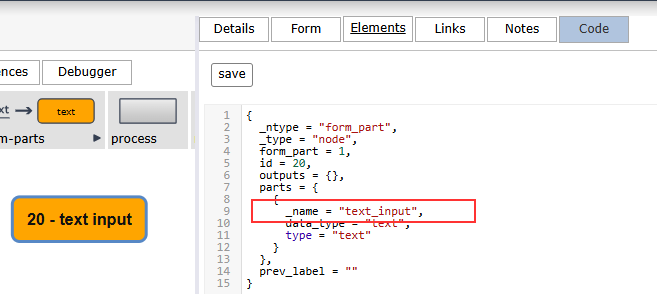
- Change the _name value from "text_input" to "hidden_input" and save the change.
- Click the Form tab and double-click on the element to configure the part.
Editor Fields
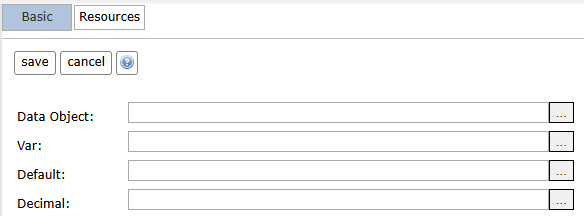
The hidden_input part has the following configuration options:
| Tab | Field Name | Description/Use | Type/Options | Optional/Mandatory |
| Basic | Data Object | This is the path to which the data is written and from which the system reads it. | Data Object | Mandatory |
| Basic | Var | This is the name of the hidden input. This name must be unique on the client page, so the client-side script can find and interact with it. | Text | Mandatory |
| Basic | Default | This is where you can enter a default value the system writes to the context if the browser does not send data. | Text | Optional |
| Basic | Decimal | This is the decimal-point character used in the application; for example, a dot (.) or a comma (,). | Text | Optional |
Reply
Content aside
- 3 mths agoLast active
- 3Views
-
1
Following